> ## Documentation Index
> Fetch the complete documentation index at: https://docs.connectly.ai/llms.txt
> Use this file to discover all available pages before exploring further.
# Finding conversations
> Filter, search, and switch views to find the right conversations in your inbox — by campaign, status, ticket number, tags, and more 🔍
The conversation list has three ways to narrow down what you see: **views**,
**filters**, and **search**. You can combine them to zero in on exactly the
conversations you need.
## Views
Views are the top-level slices of your inbox. Which ones you see depends on your role.
| View | Shows |
| ------------------ | -------------------------------------------------------- |
| **All** | Every conversation in the business. |
| **My teams** | Conversations belonging to teams you're a member of. |
| **My tasks** | Tickets assigned to you. |
| **Requires agent** | Conversations waiting for a human agent to pick them up. |
| **Sofia AI** | Conversations currently handled by Sofia AI. |
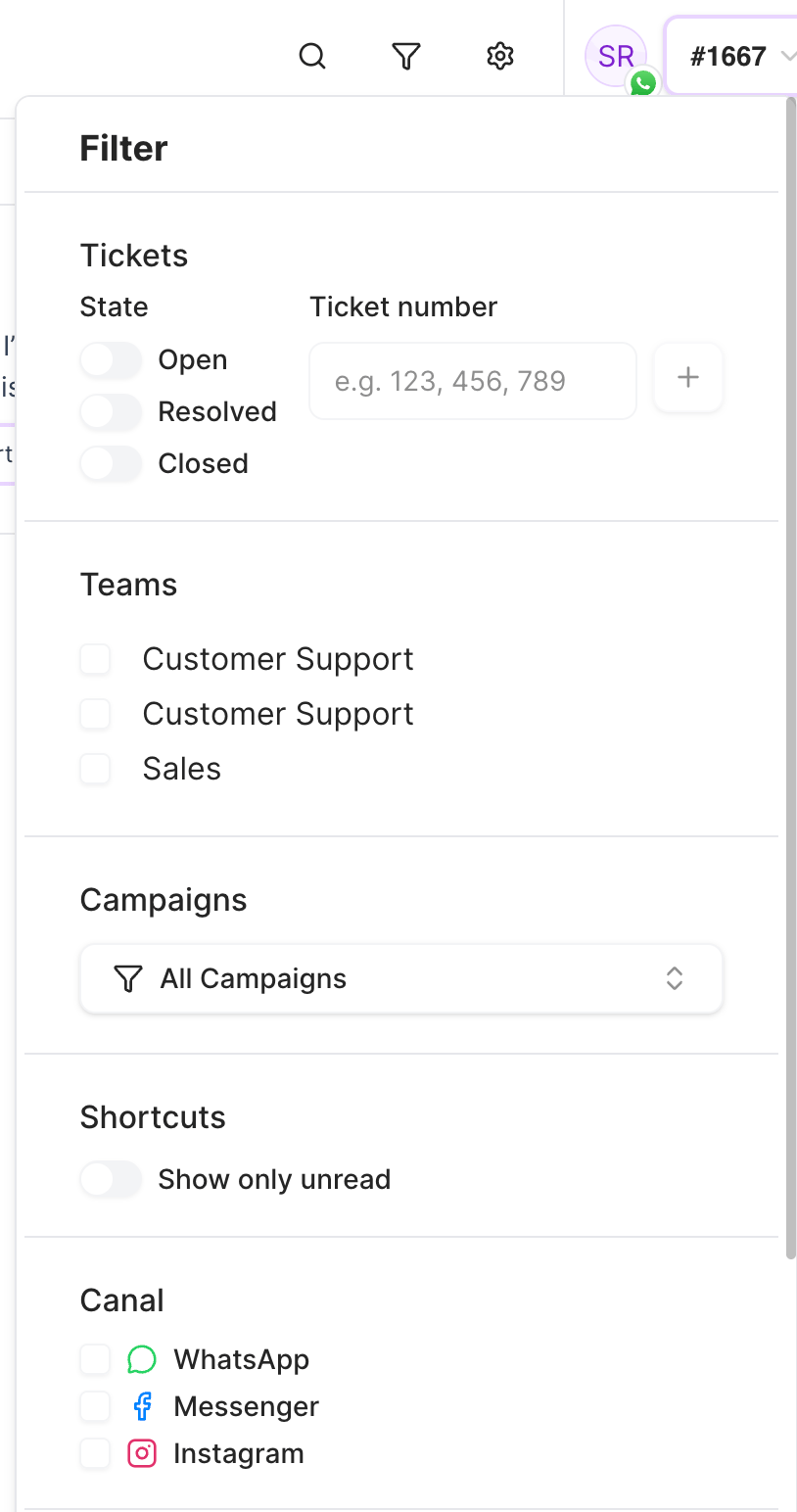
## Filters
Filters narrow the current view. You can select several values in one filter (they
combine as "any of"), and stack different filters together (they narrow the results).
| Filter | What it does |
| -------------------- | ----------------------------------------------------------------------------------- |
| **Status** | Show tickets that are **Open**, **Resolved**, or **Closed**. |
| **Ticket Number** | Enter one or more ticket numbers (for example, `123, 456, 789`). |
| **Teams** | Show conversations assigned to specific teams. |
| **Campaigns** | Show conversations tied to a specific campaign — useful for following up on a send. |
| **Channel** | **WhatsApp**, **Messenger**, or **Instagram**. |
| **Tags** | Filter by conversation tags. |
| **Topics** | Filter by ticket topics. |
| **Show Unread Only** | Show only conversations with unread messages. |
The **Campaigns** filter is the quickest way to see who you're talking to from a
specific campaign — select the campaign and the list narrows to those conversations.
 ## Search
Type in the search bar to look up conversations. Search matches:
* **Customer name**
* **Phone number or handle**
* **Campaign name** — to surface the recipients of a specific campaign, including
people who were sent a message but haven't replied yet.
Search doesn't look inside message content, and it doesn't search by ticket number.
To find a conversation by its ticket number, use the **Ticket Number** filter above.
## Sorting
The conversation list is always sorted by **most recent activity first**, so the
conversations that need attention rise to the top automatically. There's no manual
sort option.
## Search
Type in the search bar to look up conversations. Search matches:
* **Customer name**
* **Phone number or handle**
* **Campaign name** — to surface the recipients of a specific campaign, including
people who were sent a message but haven't replied yet.
Search doesn't look inside message content, and it doesn't search by ticket number.
To find a conversation by its ticket number, use the **Ticket Number** filter above.
## Sorting
The conversation list is always sorted by **most recent activity first**, so the
conversations that need attention rise to the top automatically. There's no manual
sort option.