> ## Documentation Index
> Fetch the complete documentation index at: https://docs.connectly.ai/llms.txt
> Use this file to discover all available pages before exploring further.
# Ticket Routing
> Automatically create and assign tickets when conversations need a human — and control how agents are chosen, capped, queued, and reassigned ⚙️
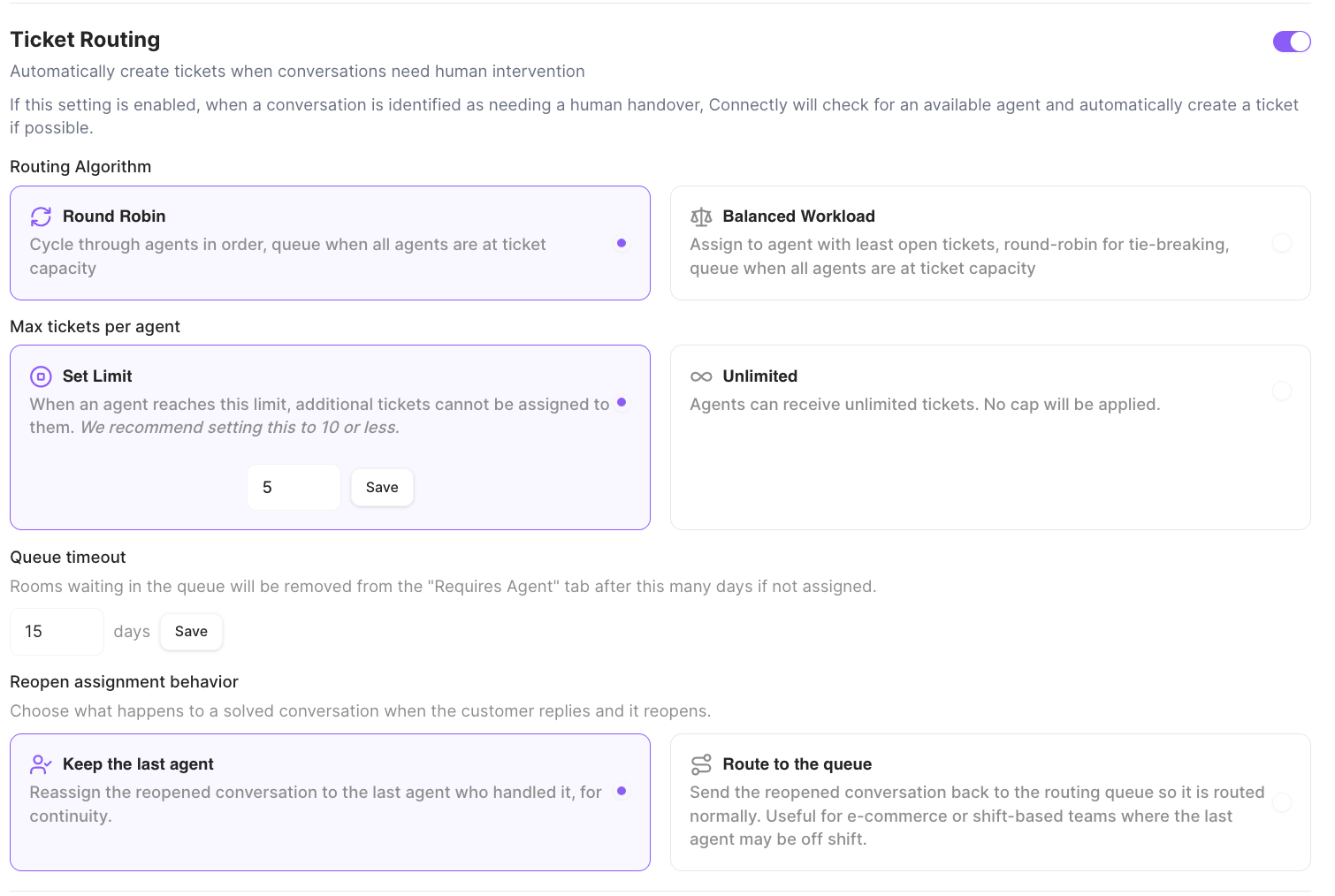
**Ticket Routing** decides whether Connectly automatically creates a ticket when a conversation needs a human, and controls exactly how that ticket is assigned. You configure it in **Settings → Inbox**. Use the toggle to turn it on or off.
> Automatically create tickets when conversations need human intervention
> If this setting is enabled, when a conversation is identified as needing a human handover, Connectly will check for an available agent and automatically create a ticket if possible.
 ## How it connects to agent handover
Ticket Routing is the bridge between a conversation that needs a person and an agent actually picking it up. When a conversation is identified as **needing a human handover**, Connectly looks for an available agent and — if it finds one — creates a ticket and assigns it automatically.
## Where conversations are routed
Ticket Routing directs each conversation using one of two scopes:
| Scope | Where the conversation goes |
| ----------------- | -------------------------------------------------------------------------------------------------------------------------------------------------------------------------------- |
| **Agent Routing** | To any available agent in the business. |
| **Team Routing** | To a **team** based on your handover setup, then to an agent within that team. This is also how conversations reach a **store** — a store is a team tied to a physical location. |
With **Team Routing**, you decide which team (or store) handles each type of handover in your agent configuration, and you can route customers to their nearest store location. That setup lives in its own article:
Organize agents into teams, connect teams to store locations, and route conversations to the right group.
Routing scopes, teams, and store routing are **advanced features** that may need to be enabled for your business. If you only see agent-based routing, contact your Connectly Account Manager.
## Routing Algorithm
Choose how Connectly picks which agent gets the next ticket.
| Option | What it does |
| --------------------- | -------------------------------------------------------------------------------------------------------------------- |
| **Round Robin** | Cycle through agents in order, queue when all agents are at ticket capacity. |
| **Balanced Workload** | Assign to agent with least open tickets, round-robin for tie-breaking, queue when all agents are at ticket capacity. |
## Max tickets per agent
Control how many open tickets a single agent can hold at once.
| Option | What it does |
| ------------- | ----------------------------------------------------------------------------------------------------------------------------------------------------------------------------------- |
| **Set Limit** | When an agent reaches this limit, additional tickets cannot be assigned to them. *We recommend setting this to 10 or less.* Enter the number and click **Save** (default is **5**). |
| **Unlimited** | Agents can receive unlimited tickets. No cap will be applied. |
When every eligible agent is at capacity, new tickets wait in the queue until someone frees up.
## Queue timeout
> Rooms waiting in the queue will be removed from the "Requires Agent" tab after this many days if not assigned.
Enter the number of days and click **Save**. The default is **15 days**.
## Reopen assignment behavior
> Choose what happens to a solved conversation when the customer replies and it reopens.
| Option | What it does |
| ----------------------- | -------------------------------------------------------------------------------------------------------------------------------------------------------------------- |
| **Keep the last agent** | Reassign the reopened conversation to the last agent who handled it, for continuity. |
| **Route to the queue** | Send the reopened conversation back to the routing queue so it is routed normally. Useful for e-commerce or shift-based teams where the last agent may be off shift. |
## How it connects to agent handover
Ticket Routing is the bridge between a conversation that needs a person and an agent actually picking it up. When a conversation is identified as **needing a human handover**, Connectly looks for an available agent and — if it finds one — creates a ticket and assigns it automatically.
## Where conversations are routed
Ticket Routing directs each conversation using one of two scopes:
| Scope | Where the conversation goes |
| ----------------- | -------------------------------------------------------------------------------------------------------------------------------------------------------------------------------- |
| **Agent Routing** | To any available agent in the business. |
| **Team Routing** | To a **team** based on your handover setup, then to an agent within that team. This is also how conversations reach a **store** — a store is a team tied to a physical location. |
With **Team Routing**, you decide which team (or store) handles each type of handover in your agent configuration, and you can route customers to their nearest store location. That setup lives in its own article:
Organize agents into teams, connect teams to store locations, and route conversations to the right group.
Routing scopes, teams, and store routing are **advanced features** that may need to be enabled for your business. If you only see agent-based routing, contact your Connectly Account Manager.
## Routing Algorithm
Choose how Connectly picks which agent gets the next ticket.
| Option | What it does |
| --------------------- | -------------------------------------------------------------------------------------------------------------------- |
| **Round Robin** | Cycle through agents in order, queue when all agents are at ticket capacity. |
| **Balanced Workload** | Assign to agent with least open tickets, round-robin for tie-breaking, queue when all agents are at ticket capacity. |
## Max tickets per agent
Control how many open tickets a single agent can hold at once.
| Option | What it does |
| ------------- | ----------------------------------------------------------------------------------------------------------------------------------------------------------------------------------- |
| **Set Limit** | When an agent reaches this limit, additional tickets cannot be assigned to them. *We recommend setting this to 10 or less.* Enter the number and click **Save** (default is **5**). |
| **Unlimited** | Agents can receive unlimited tickets. No cap will be applied. |
When every eligible agent is at capacity, new tickets wait in the queue until someone frees up.
## Queue timeout
> Rooms waiting in the queue will be removed from the "Requires Agent" tab after this many days if not assigned.
Enter the number of days and click **Save**. The default is **15 days**.
## Reopen assignment behavior
> Choose what happens to a solved conversation when the customer replies and it reopens.
| Option | What it does |
| ----------------------- | -------------------------------------------------------------------------------------------------------------------------------------------------------------------- |
| **Keep the last agent** | Reassign the reopened conversation to the last agent who handled it, for continuity. |
| **Route to the queue** | Send the reopened conversation back to the routing queue so it is routed normally. Useful for e-commerce or shift-based teams where the last agent may be off shift. |